DDR3 and DDR4 Laptop Memory Compatible? No.

Are DDR3 and DDR4 laptop memory (RAM) compatible? That’s a common question when it comes to memory upgrades. For instance, you bought a new laptop with DDR4 RAM and want to add more memory to it by inserting a DDR3 RAM module from your older laptop. You wonder if that’s possible. Unfortunately, that can’t be done. DDR3 and DDR4 laptop memory are not compatible / interchangeable.

First of all, a DDR3 laptop RAM module can’t physically fit into a DDR4 laptop RAM slot and vice versa. Notches on the connectors of memory sticks are on different places. The same applies to corresponding bumps in the RAM slots on notebook’s motherboards. Also, the number of pins doesn’t match. A DDR3 laptop memory module has 204 pins, whereas DDR4 has 260. Finally, DDR3 memory is a bit shorter than DDR4 – 2.66 versus 2.74 inches.
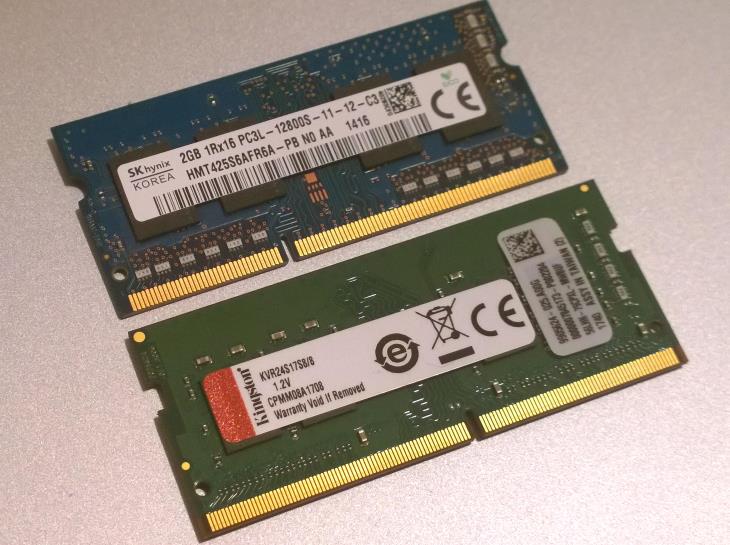
DDR3 and DDR4 Laptop RAM Compatibility

So, a DDR3 memory module won’t fit in a DDR4 slot…
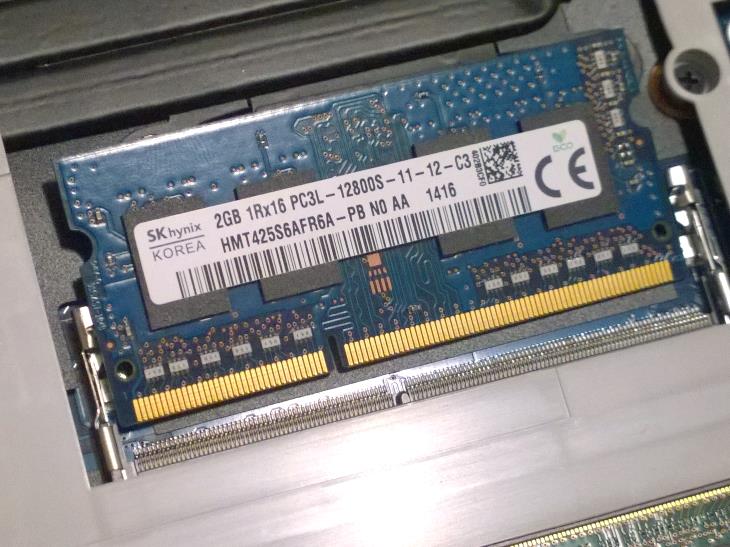
DDR3 Laptop RAM Can't Fit in DDR4 Slot

And a DDR4 stick is incompatible with a DDR3 slot…
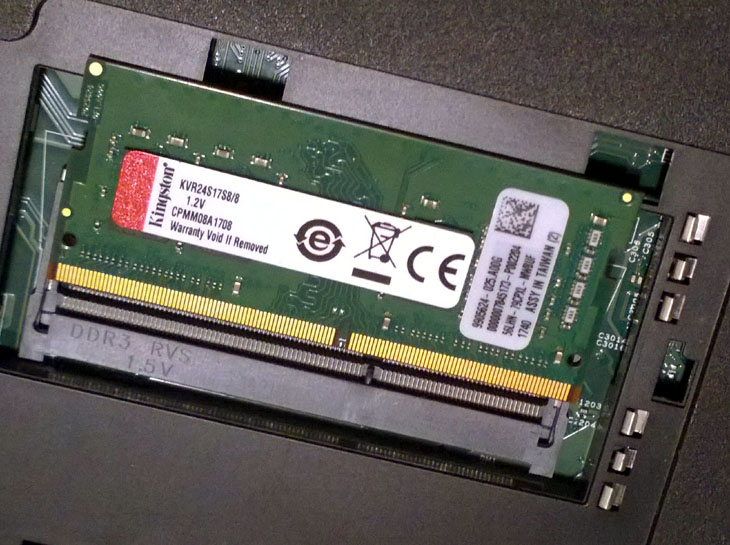
DDR4 Laptop RAM Cant Fit in DDR3 Slot

Besides the physical differences, DDR3 and DDR4 RAM differ in voltages. DDR3 uses a voltage of 1.5V (or 1.35V for DDR3L variant). DDR4 uses 1.2V. It is more power efficient and generally faster, but doesn’t noticeably improve overall performance nor battery life of notebooks.

Note: If you see “SODIMM” in specs of both DDR3 and DDR4 laptop memory, that doesn’t mean they are compatible. SODIMM only means they are small memory modules commonly used in laptops and some small form factor PCs, as opposed to physically much bigger DIMM memory used in traditional desktop computers. As a side note, DDR3 and DDR4 DIMMs aren’t compatible neither.

Posted on:

Posted in:

,

By:

  1. Dell Technical Support Avatar
    Dell Technical Support

    DDR3 and DDR4 laptop memory are not compatible/interchangeable. You cannot interchange DDR3 and DDR4 laptop memory. Thanks, for sharing the information which is mention here. Keep posting such type of information.

  2. hrishi Avatar
    hrishi

    thanks for this post ,easily understandable .

  3. Hard Drive Data Recovery Avatar
    Hard Drive Data Recovery

    This is nice post. A DDR3 laptop RAM module can not physically fit into a DDR4 laptop RAM slot and vice versa. Notches on the connectors of memory sticks are on different places. Thanks!!

  4. David Avatar

    How about DDR3L and DDR4

    1. Dan Z Avatar

      They are not compatible.

  5. Allan KADANGO Avatar
    Allan KADANGO

    Thanks for the info and quite educative piece of information

  6. Moris Avatar
    Moris

    How do I check if my laptop uses ddr3 or ddr4?

    1. Dan Avatar
      Dan

      Hi, if you don’t have a specs sheet of your laptop, you can download CPU-Z program. Under the Memory tab, CPU-Z lists the memory type, so you can see it there. CPU-Z is a free program. Also, you can do the same with HW-Info program for free.

  7. Evan Avatar
    Evan

    Hi Dear,
    Good news,our factory have promotions on ram memory now..
    there are the price for the ram laptop/desktop as follow:
    Application:Desktop/Laptop
    DDR2 2G 800mhz 2.5$
    DDR3 2G 1333/1600mhz 3.1$
    DDR3 4G 1333/1600mhz 7.5$
    DDR3 8G 1333/1600mhz 16.5$
    DDR4 4G 2400/2666mhz 9.7$
    DDR4 8G 2400/2666mhz 17.8$
    DDR4 16G 2400/2666mhz 35.5$
    SSD 120G 11.4$
    SSD 240G 19.8$

    For further question please sent us message.

    1. Kelvin Avatar
      Kelvin

      How do i buy from you???

    2. Ahmad Avatar
      Ahmad

      What’s your website to order RAMs?

    3. Nirmal Kishor Daksh Avatar
      Nirmal Kishor Daksh

      From where i can Purchase.
      DDR3 4G 1333mhz.

    4. Ajay Kumar Avatar
      Ajay Kumar

      Hi
      I want to order a DDR3 8G 1333/1600mhz SODIMM RAM for my laptop. How can I place order for the same and what is the price?

  8. hozayfa ahmad Avatar
    hozayfa ahmad

    How do i buy from you??
    i need DDR4 16G 2400/2666mhz

Leave a Reply

Your email address will not be published. Required fields are marked *